The platform

One platform. Every activity. Governed properly.

Every activity type your school runs, every AI capability, every feature. Here is how Orca works in detail.

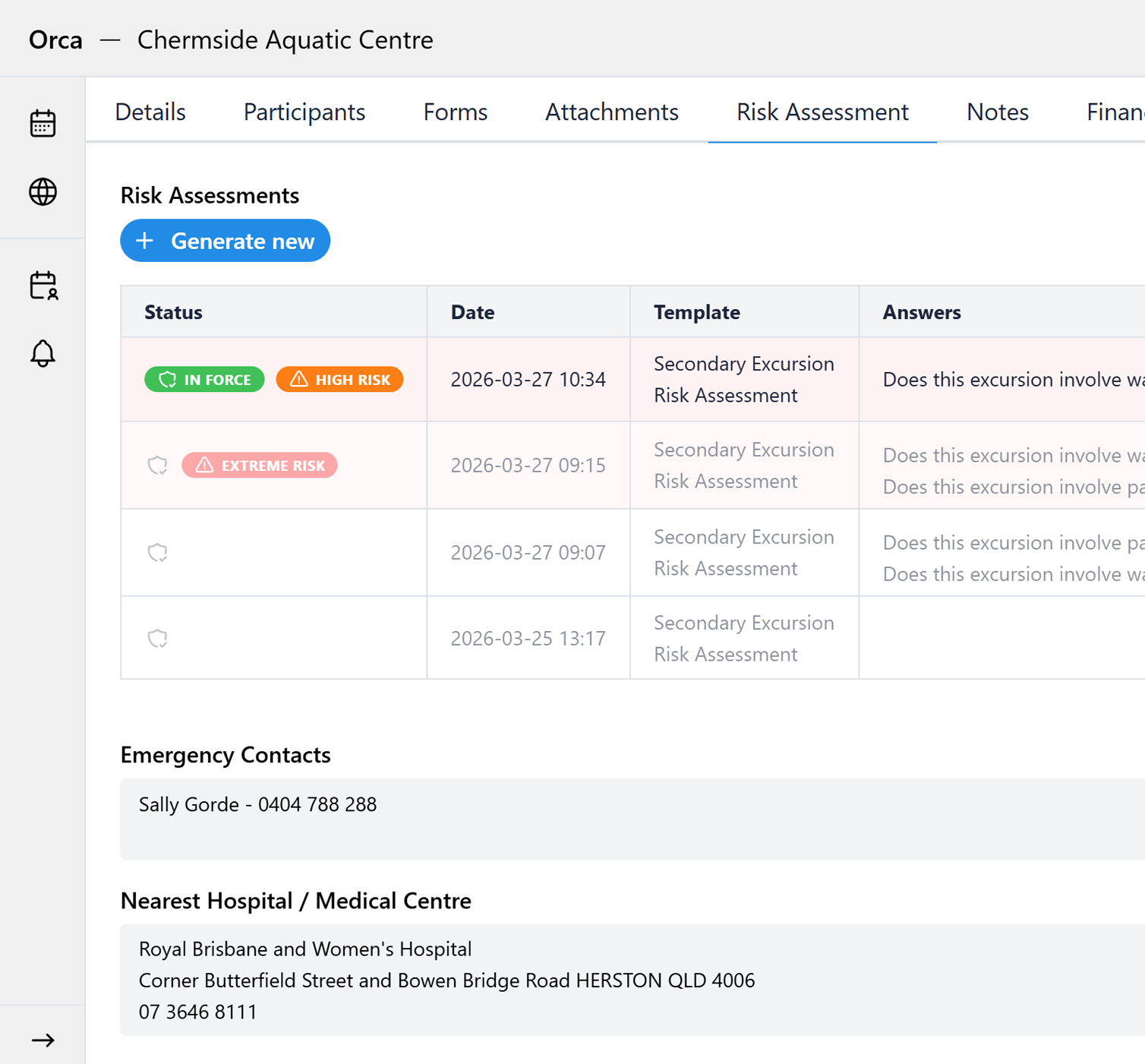
Orca risk assessment screen showing staff ratio, medical alerts, policy compliance and parent consent checks
AI compliance review
The platform

Every activity type, in
one governed place.

Orca is built around the full breadth of non-timetabled activity that Australian schools run. Every activity type is managed through Orca, with your school's business rules, approval processes, and compliance requirements applied the same way, every time.

Excursions

Day trips, incursions, and off-campus learning

Camps

Overnight and multi-day residential programs

Sports & Carnivals

Interschool sport, athletics, swimming, and cross country

Performances

School productions, recitals, musicals, and showcases

Community Service

Service learning, charity drives, and community engagement

Co-curricular

Debating, Model UN, academic competitions, and clubs

School Events

Open days, fetes, exhibitions, and parent evenings

Tours & Travel

Interstate and international student travel programs
One platform powers it all

Every feature your school needs,
including three built-in AI capabilities.

From first draft to post-activity record, every tool is in one place. The three AI capabilities are woven throughout, active in every activity your school creates.

01

Planning assistance

Describe it. Orca structures it.

The invisible admin burden disappears before anyone notices it existed. Describe the activity in plain language and Orca draws on your school's data to build the structure, assigns tasks, and asks only what it can't determine.

02

Compliance review

Every gap caught before sign-off.

It arrives complete, reviewed, and ready to approve. Before any activity reaches an approver, Orca checks it against your policies, risk templates, staff ratios, and venue data. Missing controls flagged. Risk assessment generated.

03

Calendar insights

Answers, not dashboards.

No report to build. No spreadsheet to open. Ask any question about your school's calendar, staffing, participation, or scheduling conflicts in plain language and get a direct answer. The intelligence is already in the system.

Planning and Calendars

Staff Calendar

View all In-Review and Approved activities in calendar or list view with colour-coded status labels.

Community Calendar

Shared calendar for parents, students, and staff. Approved activities appear automatically with iCal subscription support.

Conflict Checking

Automatically detect scheduling conflicts, staff double-booking, and resource clashes before they become problems.

Programme

Build out programmes or schedules across two axes: times and streams. Add sessions and allocate teams to a stream or an individual session. When a parent views the schedule, the sessions their child takes part in are highlighted automatically.

Approvals and Governance

Approval Workflows

Configurable multi-step workflows: parallel, sequential, or mixed. Full email and in-app notifications at every step.

Digital Risk Assessments

Select a template and a professional risk assessment PDF is generated automatically. Reviewed by AI before submission.

Audit Logs

Every key action logged. Full revision history with side-by-side version comparison and restore. Always prepared for scrutiny.

Tasks

Add tasks, assign staff, and set due dates. Planners and approvers can all comment and track progress within the activity record.

Incidents

Involved staff log incidents with the students involved, witnesses, time, location, what happened, and what was done. In the backend, incidents are allocated for review and resolution so nothing is left open.

Participants, Staff and Communications

Staff List and Roles

Assign Staff in Charge, 2IC, Planner, and Attendee roles. All planners have collaborative edit access within the activity.

Student Alerts

Global and per-activity alerts surfaced at exactly the right moment. Medical flags visible to all supervising staff during roll marking.

Roll Marking

Mark attendance by occurrence or group. Per-day student alerts surface during roll call. Records are accurate and searchable after the activity.

Forms and Permissions

Enable responses from parents, staff, and students. Yes/no, free text, and file upload. Tracked in colour-coded response lists.

Notifications

Immediate or digest delivery. Alerts for comments, tasks, approvals, status changes, and upcoming activities.

Data and Integrations

SIS Integration

RESTful API connects Orca to your Student Information System. Cohort and enrolment data flows in automatically.

iCal Subscription

Subscribe via iCal to sync Orca activities directly into Outlook, Google Calendar, or Apple Calendar.

Data Export

Export activity data in CSV, Excel, PDF, HTML, or JSON. Select exactly which fields and date ranges to include.

Getting started

No migration. No disruption.
Runs alongside everything you already have.

Orca runs alongside your existing systems. Your SIS, LMS, and timetabling platform stay exactly as they are. Orca handles what those systems were never designed for: the planning, governance, and compliance of activities beyond the timetable.

1

Configure and onboard

Connect your SSO provider, import users and cohort data, configure your approval workflows and risk templates, and onboard your staff. We handle the technical setup with your IT team. Start with one activity type and expand at a pace that suits your school.

SSO integration Phased rollout No IT project
2

Connect when ready

Connect Orca to your SIS for automatic cohort and enrolment syncing. An efficiency upgrade that happens when you're ready, not as a prerequisite to getting started. Orca works well before the SIS connection is in place.

SIS integration API connection

From the first activity submitted through Orca, your school has a governed record. That’s the change.

Data security & privacy

Student data handled with the
seriousness it deserves.

Orca was built specifically for Australian schools. Every data handling decision reflects the obligations that come with managing student information, not as a compliance checkbox, but as a foundational design principle.

100% Australian data hosting

All data is hosted in Australia. Student records, activity data, and risk assessments never leave Australian jurisdiction.

Privacy Act 1988 compliant

Orca is designed and operated in full compliance with the Australian Privacy Act 1988 and the Australian Privacy Principles.

SOC 2 Type II infrastructure

Platform infrastructure meets SOC 2 Type II standards, independently assessed for security, availability, and confidentiality controls.

Student data never sold or shared

Student data is used solely to operate the platform for your school. It is never sold, shared with third parties, or used to train external models.

Role-based access controls

Every staff member sees only what their role requires. Sensitive student information is surfaced only to the people who need it, for the activity that needs it.

Enterprise-grade infrastructure

Encrypted at rest and in transit. Regular penetration testing. Automated backups. Built to the standards your school's IT and board expect.

Ready to see it in your school's context?

Book 30 minutes and we'll walk through exactly how Orca fits your activities, your governance structure, and your existing systems.

Book a 30-min Demo

What you get with Orca

AI planning assistance that structures activities from a plain-language description
Built-in compliance review on every activity before it reaches an approver
AI-generated risk assessment PDFs from your own templates
Configurable approval workflows with every step tracked and recorded
Plain-language calendar insights: answers, not dashboards
Complete audit trail, defensible to your board at any point
100% Australian data hosting, Privacy Act 1988 compliant